|
PRIMARY
KEYBOARD SHORTCUTS |
|
Shortcut |
Function/Feature |
|
Left Arrow |
Navigate
backwards to previous image within session
|
|
Right Arrow |
Navigate
forward to next image within session |
| C |
Clone or carbon copy an image within a single instance of
application. Clones can also be cloned. Closing a
parent mirror will close all child clones. |
|
Esc |
Exit a single instance of
application. Double clicking
while in navigation mode also
exits. |
| E |
Email images via mapi mail
client (Outlook, Outlook Express, IncrediMail, etc) |
| H |
Toggle between
hidden/display mode |
| I |
Display
information about product,
image position/count |
| L |
Lock pen color in doodle mode
allowing navigation of image content via wireless presenter
remote |
| M |
Minimize/Maximize
window/Hide Mirror contents |
| O |
Toggle Stay
on-top mode |
|
Ctrl + P NEW !! |
Send
screenshot/image to default printer (No prompt
provided) |
| R |
Reflect carbon copy of current
image (Pro version only) |
| S |
Start/Stop
Slideshow (Images are
displayed for 15 seconds each) |
|
Alt + S
NEW !! |
Toggle Horizontal Slideshow Effect
Animation (Pro version only) |
| T |
Toggle
Transparency Mode |
 |
|
Back to
Home Page | Go to
Download Page |
Video Demo |
|
ADVANCED
KEYBOARD SHORTCUTS |
|
Shortcut |
Function/Feature |
|
Alt+Keypad # |
Move mirror to specific screen
on multi-monitor systems. e.g.
Alt+ Keypad 2 (Pro version only) |
|
Ctrl+F NEW !! |
Search for image
files via keyword on disk |
|
Alt+R |
Reflect current
image to network share folder
(Pro version only) |
|
Ctrl + S |
Save mirror contents as
playlist (Files are saved in a
subfolder within Documents called
Yascu Mirror) |
|
Ctrl + V |
Paste image filename or
URL into mirror |
|
Delete |
Delete image from session |
|
Ctrl+Del |
Delete
image from disk and session (Pro version only -no
confirmation given) |
| U |
Check for new
version and update via internet |
|
Ctrl+N |
Specify network
share to reflect a carbon copy
of image content (Pro version only) |
|
F4 |
Send
image to Windows Paint |
|
F8 NEW !! |
Load speed dial
for image navigation (5 dials for free version, 12 for
Pro version) |
|
F9 |
Send
image to SnagIt (Pro version only) |
|
Up Arrow |
Increase doodle
pen size |
|
Down Arrow |
Decrease doodle
pen size |
|
Page Up |
Switch to
last doodle pen color |
| Page
Down |
Switch to
next doodle pen color |
|
Home |
Navigate to
first image in session |
|
End |
Navigate to
last image in session |
|
Right Click |
Switch Mirror Mode (3
modes include: Navigate,
Doodle,
Options) |
|
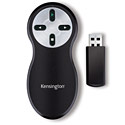
WIRELESS
PRESENTER FEATURE SET |
|
|


 YASCU
Mirror was designed for usability with
or without a keyboard and mouse, so that the same functionality
could extend to a touch screen/tablet PC - with or without the use
of a wireless presenter remote. This design makes YASCU Mirror
very flexible for use in
various scenarios and computing
environments.
YASCU
Mirror was designed for usability with
or without a keyboard and mouse, so that the same functionality
could extend to a touch screen/tablet PC - with or without the use
of a wireless presenter remote. This design makes YASCU Mirror
very flexible for use in
various scenarios and computing
environments.