Copyright © 2008-2010 ® Shade Software Solutions LLC


ABOUT TRUST ONLINE
EASY FIT FOR UMPCs, NETBOOKS, & TABLETS

No Installation Required
Download and run in 9.58 seconds or less.


CAPTURE YOUR SCREEN, CAPTURE YOUR AUDIENCE TM

HOME DOWNLOAD BUY PRO VIDEO DEMO FEEDBACK REVIEWS CONTACT US  

  YASCU CAPTURES ON  


What is YASCU ?
A.  Yet Another Screen Capture Utility  B. Jpeg viewer designed to present & illustrate content
C.  Tiny 100KB zero installation utility   D. Crossover screenshot & multi-purpose business tool
E.  All of the above

A COOL TOOL FOR SCHOOL, TECH, HOME, OR BUSINESS


Wireless Presenter Remote Ready !
One Click Capture of up to 4 Monitors !


GO GREEN:
Clip & Save Online Receipts


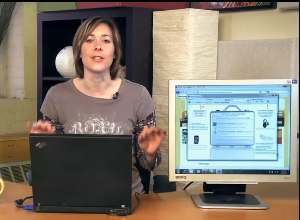
Cheryl Poirier aka Miss Download does a video tutorial of YASCU

Tucows Video Review

  Use finger/mouse gestures to present content on Touch/Tablet PCs

TECH TOOL: End User Support, IT/System Admin Documentation

 - Doodling feature is only for temporary illustration purposes and is not  saved to image
 - The PC name is used as the default in saving screenshots for easy source identification

GREEN FOOTPRINT OF 100 KB
Small Size = Superb Strength
 Bookmark and Share

Capture Mode Instant/Timer Free CE Pro
Desktop +
Active Window
Mouse Region Freeshots
Clipboard Freeshots
Fixed Region + Freeshots
User Defined + Freeshots
Workspace + Freeshots
One Click Multi-Monitors +
Compare Editions

Freeshots are a limited number of pro feature captures per session

Buy once, use for a lifetime - $11.95


Congratulations to our grand prize
winner from Florida, USA


GO PRO AND YOU COULD BE THE NEXT TO WIN A FREE
Apple iPad + Wireless Presenter Remote


(Offer valid from 7/1/2010 - 7/31/2010)
Includes free shipping to any US, Canada, or UK territory


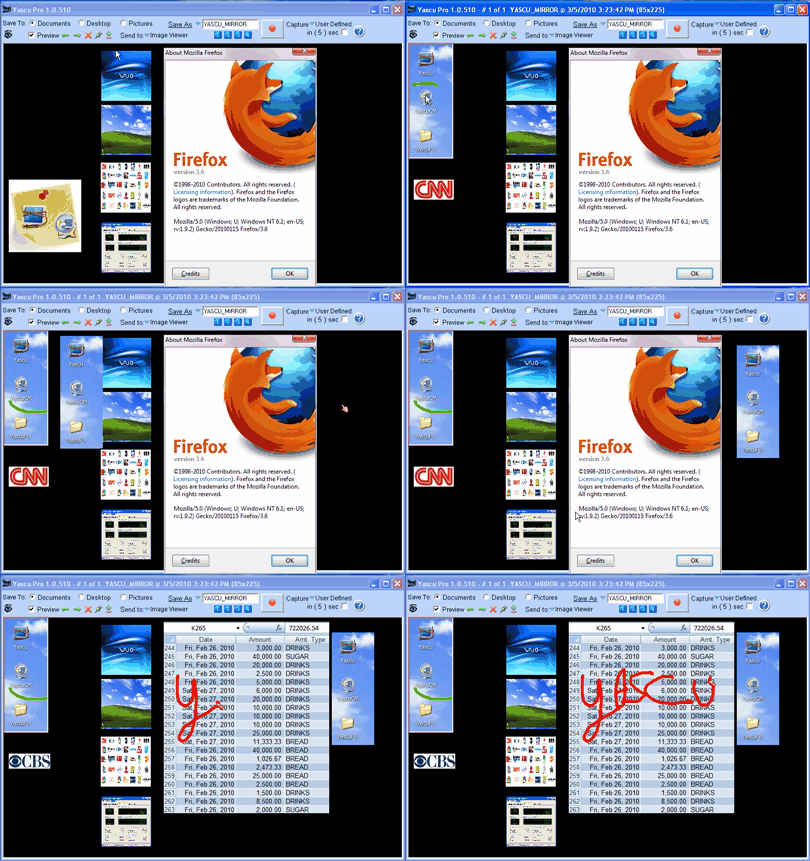
NEW: COOL FREE YASCU MIRROR ADD-ON TURNS SCREENSHOTS + CLIPPINGS INTO STICKY NOTES, AND PRESENTS IMAGE CONTENT AS A SLIDESHOW


DESIGN

The design strategy for this application was to optimize it for size, speed and simplicity without compromising usability and functionality.  The resulting tool not only strikes this delicate balance, but executes and achieves the following three main design objectives:

          
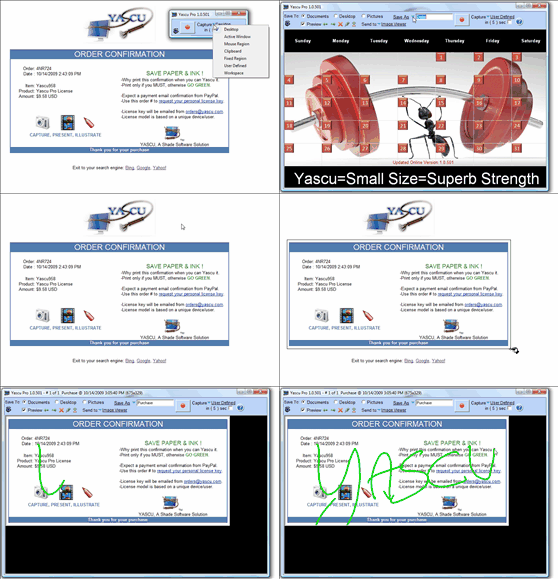
CAPTURE, PRESENT, ILLUSTRATE

Capture and save images automatically and efficiently.
Present and preview by navigating captured images quickly.
Ilustrate seamlessly to facilitate interaction during presentations.

Any functionality that would add unnecessary  overhead, or introduce heavy external dependencies to the core application, was excluded or deferred to an external application, or future add-ons.  As a result, some design tradeoffs were made, such as only supporting the JPEG image format.   The end result is a lean green screen capture machine.

F4 shortcut sends screenshots to Microsoft Paint for editing              
F9 shortcut sends screenshots to Snagit editor if configured (Pro only) 
F10 global hotkey captures and saves screenshots instantly
Print Screen + clipboard capture saves screenshots automatically to disk

PRACTICAL USES

Reduce paper and ink costs by clipping small online receipts and payment confirmations.
Use as a companion utility for other software like Snagit, Microsoft Word/PowerPoint, OneNote, Microsoft Paint.
Use to quickly create a  visual screenshot log of websites visited.
Capture online webinar content using fixed region captures using wireless presenter remote.
Use as a mini slide show tool to present and illustrate during training and presentations, by dragging and dropping JPEG images into the application and navigating content with a wireless presenter remote.
Useful as an education tool for students and teachers ranging from elementary/high school, to colleges/universities.  Visually engage children, teenagers, and adults in the classroom with image content.
Use as an interactive sales tool to present product and promotional images to customers on the sales floor of retail businesses.
Use as a part of enterprise document imaging solutions to clip & save portions of scanned documents for further processing.
Capture text as images to help secure information against automated parsing of email addresses on a website or software license keys.

Use as an end user or tech support tool  to visually log, submit, or review application error messages and system configuration settings.

Use to quickly prepare training and documentation materials.
Use to create a mirror effect of screen contents on one monitor for side by side comparison on a second monitor/high resolution LCD.
Conserve energy by temporarily capturing and viewing contents of multi-monitor desktops without turning on secondary displays.
Efficient tech support tool for use during remote desktop sessions such as the LogMeIn service by using clipboard captures.
Useful zero installation tool for application development or testing within Virtual PC and Virtual Server environments.


Have you discovered a creative use for YASCU, please give us some feedback.

KEY FEATURES

Lightweight single standalone executable with zero dependencies.

Requires no installation or un-installation.

Small 100KB footprint makes downloads & online updates very fast.

Compatible with 32 & 64 bit platforms of XP, Vista, Windows 7, Windows Server 2003 and 2008, and is also usable in safe mode.
Alternative snipping tool for Windows 7 Starter or Vista Basic

      Designed and optimized for usability on UMPC's, netbooks, and advanced multi-monitor desktops with resolutions of 800x600 or higher. Auto sizes for low screen resolutions.

Captures and saves images automatically to disk with timestamp.

Stores images in universal JPEG format.

Simple, single window interface design accelerates user productivity.

One click oriented design boosts user productivity and efficiency.

Supports full screen, sizable, and compact operation modes.
Recalls last screen position when resized to full or compact modes.
Plenty of keyboard shortcuts to increase productivity for power users.

Use as a JPEG viewer with drag and drop file support.

Supports wireless presenter remotes for screenshot navigation, capture,  and sending images to external applications.

Supports one click capture of multi-monitor desktop screen content.

Supports mouse gestures for Tablet PC & Touch Screen computers for intuitive and natural navigation of images with finger or stylus.

Supports built in hotkeys for transfer of images to SnagIt, MS Paint, and any user defined external application. System wide hotkey -F10

      Self contained and integrated help displayed as images via the internet. No external browser or application files needed.

      Additional functionality available through future add-ons.

Lifetime free updates for all free and registered users.


ABOUT TRUST ONLINE

Copyright © 2008-2010 Shade Software Solutions LLC
YASCU
® is a registered trademark of Shade Software Solutions LLC, All Rights Reserved